I've been deep in mobile app growth for a while now, and one thing that's always bothered me is how hard it is to get a structured, honest audit of your App Store listing without either paying an agency thousands of dollars or spending hours doing it manually.
So I built something. It's called ASO Auditor — a Claude skill that analyzes your App Store and Google Play listings, scores them across 7 pillars, identifies the gaps, and generates a live interactive report right inside Claude. No subscription, no account, no setup. Just install the skill and point it at any app.
To show you what it actually does, I ran it on InShot — one of the most downloaded video editing apps in the world with 500M+ users and 23.5M Android reviews. Even apps at this scale have gaps. Let me walk you through what the skill found.
The audit: InShot on iOS and Android
The skill runs a dual-platform audit by default — it pulls both the App Store and Google Play listings and scores them independently, then compares them side by side.
Here's what came back for InShot:
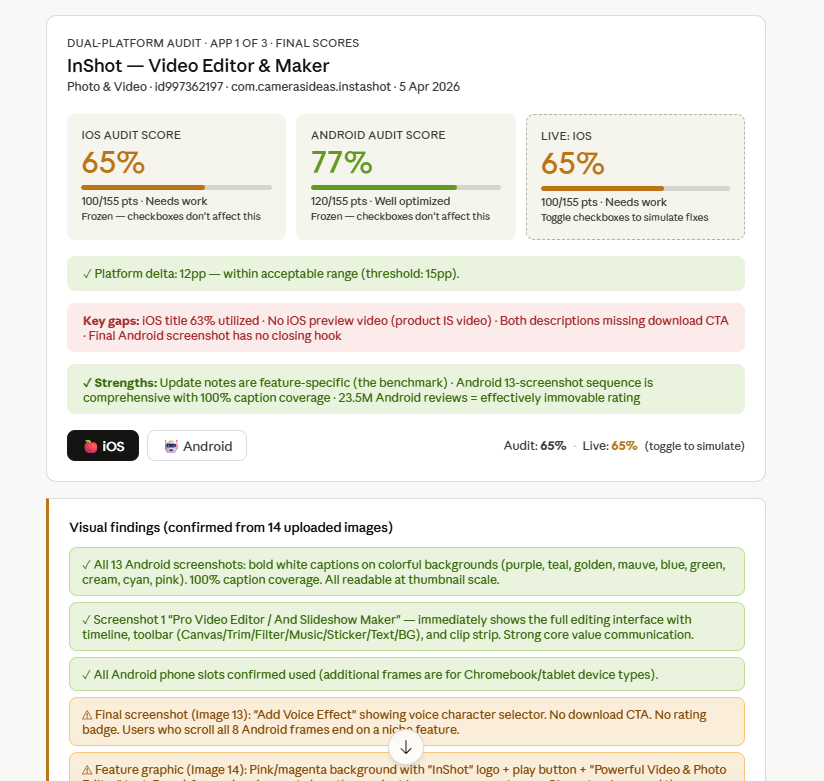
iOS: 65% — 100/155 points. Needs work. Android: 77% — 120/155 points. Well optimized.
The platform delta is 12 points — within the acceptable threshold of 15pp, so they're not wildly misaligned. But iOS is clearly being underserved relative to Android, and for an app that almost certainly does more revenue on iOS, that's worth paying attention to.
The key gaps the skill flagged immediately:
- iOS title is only 63% utilized — 11 characters left unused in the highest-weighted indexing field on the App Store
- No iOS preview video — this scores 0/20 points. The product is video creation. A screen recording would communicate in 15 seconds what 10 screenshots can't
- Both descriptions end with contact emails and legal text — no download CTA on either platform
- Final Android screenshot ends on a feature frame with no closing hook
The strengths it confirmed: Android's 13-screenshot sequence with 100% caption coverage is the benchmark. Update notes are feature-specific (rare and valuable). And 23.5M Android reviews means the ratings pillar is effectively immovable — no competitor is touching InShot there.
The 7-pillar breakdown
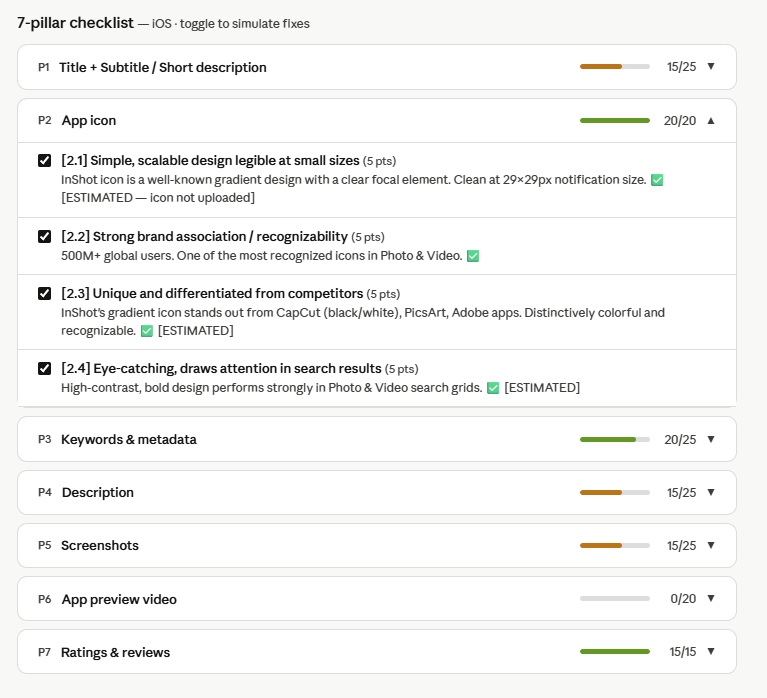
The skill scores every listing across the same 7 pillars: Title, Icon, Keywords, Description, Screenshots, Preview Video, and Ratings. Each pillar has sub-criteria with point values. Here's InShot's iOS breakdown:
A few things jump out here:
Icon: 20/20. InShot's gradient icon is one of the most recognizable in Photo & Video. It stands out against CapCut (black/white), PicsArt, and Adobe apps. This is what a 20/20 icon score looks like — distinctive, high-contrast, legible at 29×29px notification size.
Preview video: 0/20. This is the biggest single opportunity in the entire audit. Twenty points sitting on the table for an app where the entire value proposition is visible in a 30-second screen recording. This one fix alone would push the iOS score from 65% to roughly 78%.
Title: 15/25. "InShot - Video Editor" at 19 characters. The limit is 30. That's 11 unused characters in the field that carries the most keyword indexing weight on the App Store. We'll get to what the fix looks like in a second.
The keyword testing lab
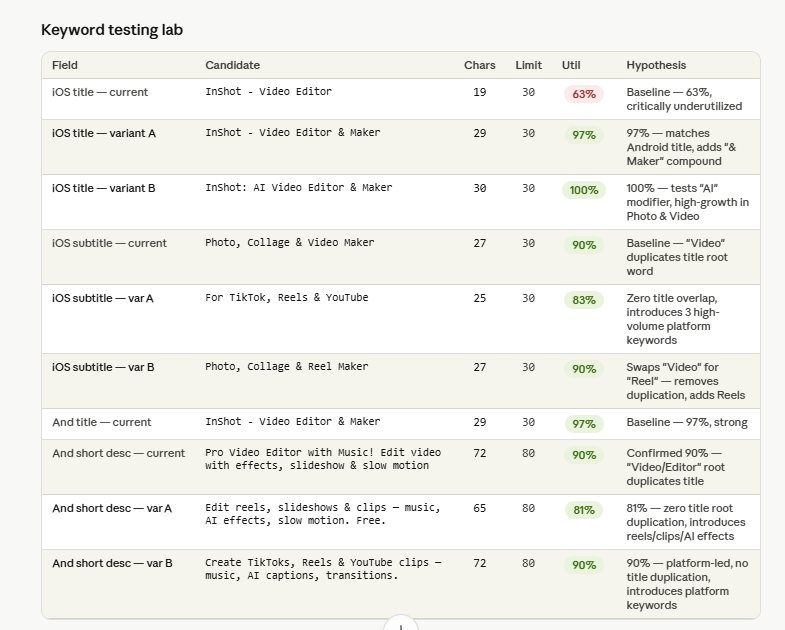
One of the things I'm most proud of in this skill is the keyword testing lab. It doesn't just tell you your title is underutilized — it generates variants and estimates the utilization improvement for each one.
Look at the iOS title section:
- Current: "InShot - Video Editor" — 19 chars, 63% utilization
- Variant A: "InShot - Video Editor & Maker" — 29 chars, 97% utilization — matches the Android title, one-day change
- Variant B: "InShot: AI Video Editor & Maker" — 30 chars, 100% utilization — tests the "AI" modifier, which is high-growth in Photo & Video right now
The subtitle situation is also interesting. Current subtitle is "Photo, Collage & Video Maker" — the word "Video" appears in both title and subtitle, which wastes one of the most valuable indexing slots. Variant A swaps to "For TikTok, Reels & YouTube" — zero title overlap, introduces three high-volume platform keywords that creators are actively searching.
This is the kind of analysis that would take an ASO analyst an hour to put together. The skill does it as part of the standard output.
Prioritized opportunities
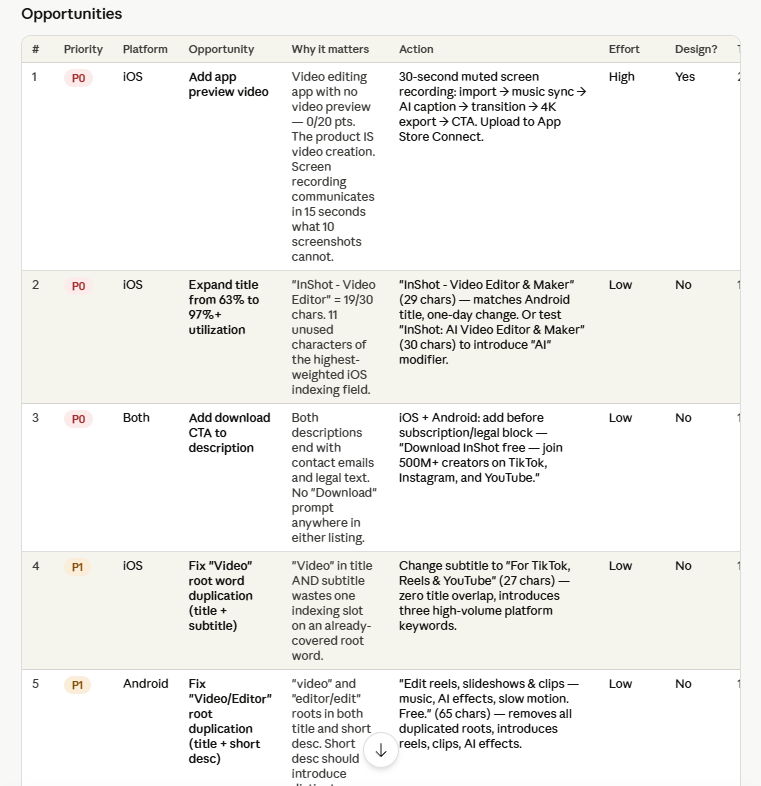
After the scoring, the skill generates a ranked opportunity table — every fix organized by priority (P0/P1/P2), platform, effort level, and whether it needs a designer.
The top three P0 opportunities:
- Add iOS preview video — High effort, needs design, but this is 20 points and a category where InShot's product literally sells itself on video
- Expand iOS title from 63% to 97%+ — Low effort, no design needed, one-day change
- Add download CTA to both descriptions — Low effort, no design, just add "Download InShot free — join 500M+ creators on TikTok, Instagram, and YouTube." before the legal block
Items 2 and 3 together take maybe 30 minutes and would meaningfully improve conversion on both platforms.
The 90-day roadmap
The skill also generates a day-by-day implementation roadmap that sequences all the fixes based on dependencies, effort, and testing windows.
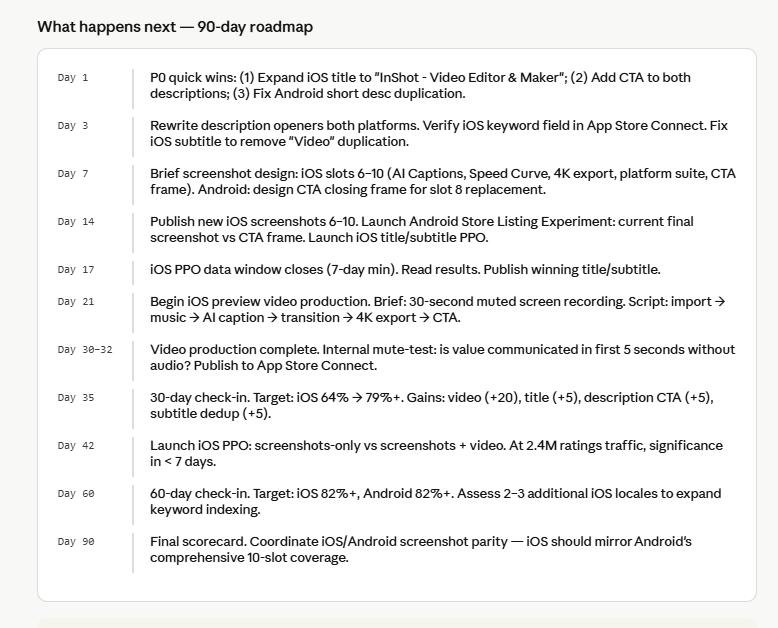
Day 1 actions are all copy-only, zero design required:
- Expand iOS title to "InShot - Video Editor & Maker"
- Add CTA to both descriptions
- Fix Android short description duplication
By Day 35 the target is iOS moving from 64% to 79%+ — driven primarily by adding the preview video (+20), fixing the title (+5), adding description CTA (+5), and fixing the subtitle duplication (+5).
The 60-day checkpoint targets iOS 82%+ and Android 82%+, with platform parity as the end goal by Day 90.
How to install it
The skill is free and open source. Here's how to get it running:
1. Install Claude Desktop if you don't have it.
2. Download the skill.md file from the GitHub repo: github.com/vagabond911/aso-auditor
3. In Claude Desktop, go to Customize → Skills → Upload skill and upload the skill.md file you just downloaded.
4. Open a new conversation and type:
/aso-auditor
Claude will ask for your App Store or Google Play URL. Paste it and you'll get the full scored report — dual-platform if you provide both URLs, single platform if you provide one.
The interactive simulation widget at the bottom of the report lets you toggle each opportunity on/off and watch your projected score update in real time. That part is genuinely useful when you're trying to make the case for a fix to a product team — you can show them the point delta before anyone writes a line of copy.
Why I built this as a Claude skill
There are plenty of ASO data platforms out there — Sensor Tower, AppTweak, AppFollow. Those tools are great for keyword volume and rank tracking. What they don't do is look at your actual listing content and tell you what to fix and why.
ASO Auditor is a reasoning layer. It reads your listing the way a user would, scores what it sees against a consistent rubric, and generates recommendations that reference your specific content. When it says your description is missing a CTA, it shows you exactly where to add it and what to write.
I also wanted it to be something any app founder could use — not just teams with ASO budget. Making it a Claude skill means there's no infrastructure, no API keys to manage, no subscription. You get the same output whether you're running it on a 10-person team or building solo.
If you run an audit and want to talk through the roadmap output, drop a comment or reach out. And if you're an ASO practitioner who wants to fork it and adjust the scoring weights for a specific category — fitness, games, finance each have different conversion levers — the repo is fully open.
GitHub: github.com/vagabond911/aso-auditor
Get Your Free Growth Audit
We map your creative workflow against the B×B×P×F matrix and show you exactly where you're leaving money on the table.
30 minutes. No sales pitch.Vageesh Velusamy
Growth Architect & Performance Marketing Leader11+ years in performance marketing across fintech, streaming, and e-commerce. $400M+ in managed ad spend. Specializes in modular creative systems and AI-powered growth for lean teams.
Share this article:
Get Your Free Growth Audit
We map your creative workflow against the B×B×P×F matrix and show you exactly where you're leaving money on the table.
30 minutes. No sales pitch.